Loading...
Loading...
Loading...
Loading...
Loading...
Loading...
Loading...
Loading...
Loading...
Updates to the ledger code running on cheqd mainnet/testnet is voted in via governance proposals on-chain for "breaking" software changes.
We use semantic versioning to define our software release versions. The latest software version running on chain is in the v2.x.x family. Any new release versions that bump only the minor/fix version digits (the second and the third part of release version numbers) is intended to be compatible within the family and does not require an on-chain upgrade proposal to be made.
Network-wide software upgrades are typically initiated by the core development team behind the cheqd project. The process followed for the network upgrade is defined in our via network governance.
Additionally, these software upgrades are discussed off-chain on and on .
You can find more details on the actual upgrade process under in our
lists previous software upgrade proposals and specific instructions on how to execute them.
This document offers the information and instructions required for node operators complete an upgrade with a fresh installation.
We decided to remove the debian package as an installtion artifact and use our own installation tool. The main reason for this is to help our current and future node operators join the cheqd network or complete an upgrade in a more intuitive, simpler and less time intensive way.
For this upgrade from 0.5.0 to 0.6.0 there are 2 possible scenario:
upgrade by installing Cosmovisor
upgrade only cheqd-noded binary.
is a tool from the cosmos-sdk team which is able to make an upgrade in a full-auto mode. It can download and exchange binary without any actions from a node operator. Beginning with version 0.6.0, and with all subsequent versions, we will leverage Cosmosvisor as a tool to handling our upgrade process.
For . You will find answers to common questions within this document, however of course feel free to reach out to the team on Slack or Discord.
As the installation and setting up the Cosmovisor can be difficult, and requires some additional steps for setting up the systemd service, we injected all this steps into our interactive installer.
The flow for installtion is:
systemd serviceMake sure that it was definitely stopped by using:
The output should be:
the main focus here: Active: inactive (dead)
cheqd-noded binary with the Cosmovisor installationIMPORTANT For running an Upgrade scenario you'll be required to setup a current home directory for a cheqd user as an answer on question Set path for cheqd user's home directory [default: /home/cheqd]:. This is because the upgrade scenario will only be used if this directory exists.
WARNING Please make sure that you answered yes for questions about overwriting existing configuration. It's very important when making a new installation with Cosmovisor.
systemd serviceIf you are updating a current installation the next steps can be used:
systemd serviceand make sure that it was really stopped by:
Output should be like:
the main focus here: Active: inactive (dead)
IMPORTANT For running an Upgrade scenario you'll be required to setup a current home directory for a cheqd user as an answer on question Set path for cheqd user's home directory [default: /home/cheqd]:. This is because the upgrade scenario will only be used if this directory exists.
WARNING. IF you are keeping just standalone a cheqd-noded, without Cosmovisor, it's crucial you keep your systemd service files without overwriting them. Please make sure that your answers were no.
sudo systemctl stop cheqd-nodedsystemctl status cheqd-noded● cheqd-noded.service - Service for running cheqd-node daemon
Loaded: loaded (/lib/systemd/system/cheqd-noded.service; enabled; vendor preset: enabled)
Active: inactive (dead) since Thu 2022-07-07 12:31:12 UTC; 27s ago
Docs: https://docs.cheqd.io/node
Process: 13427 ExecStart=/usr/bin/cheqd-noded start (code=exited, status=0/SUCCESS)
Main PID: 13427 (code=exited, status=0/SUCCESS)sudo apt remove cheqd-nodewget -c https://raw.githubusercontent.com/cheqd/cheqd-node/interactive_installer/installer/installer.py
sudo python3 installer.py1) v0.5.0
2) v0.6.0
3) v0.6.0-rc2
4) v0.6.0-rc1
5) v0.5.0-rc2
Choose list option number above to select version of cheqd-node to install [default: 1]:
2
Set the path for cheqd user's home directory [default: /home/cheqd]:
Existing cheqd-node configuration folder detected. Do you want to upgrade an existing cheqd-node installation? (yes/no) [default: no]:
y
********* INFO: Installing cheqd-node with Cosmovisor allows for automatic unattended upgrades for valid software upgrade proposals.
Install cheqd-noded using Cosmovisor? (yes/no) [default: yes]:
y
Overwrite existing configuration for cheqd-node logging? (yes/no) [default: yes]:
y
Overwrite existing configuration for logrotate? (yes/no) [default: yes]:
ysudo systemctl start cheqd-cosmovisorsudo systemctl stop cheqd-nodedsystemctl status cheqd-noded● cheqd-noded.service - Service for running cheqd-node daemon
Loaded: loaded (/lib/systemd/system/cheqd-noded.service; enabled; vendor preset: enabled)
Active: inactive (dead) since Thu 2022-07-07 12:31:12 UTC; 27s ago
Docs: https://docs.cheqd.io/node
Process: 13427 ExecStart=/usr/bin/cheqd-noded start (code=exited, status=0/SUCCESS)
Main PID: 13427 (code=exited, status=0/SUCCESS)sudo apt remove cheqd-nodewget -c https://raw.githubusercontent.com/cheqd/cheqd-node/interactive_installer/installer/installer.py
sudo python3 installer.py1) v0.5.0
2) v0.6.0
3) v0.6.0-rc2
4) v0.6.0-rc1
5) v0.5.0-rc2
Choose list option number above to select version of cheqd-node to install [default: 1]:
2
Set path for cheqd user's home directory [default: /home/cheqd]:
Existing cheqd-node configuration folder detected. Do you want to upgrade an existing cheqd-node installation? (yes/no) [default: no]:
y
********* INFO: Installing cheqd-node with Cosmovisor allows for automatic unattended upgrades for valid software upgrade proposals.
Install cheqd-noded using Cosmovisor? (yes/no) [default: yes]:
n
Overwrite existing systemd configuration for cheqd-node? (yes/no) [default: yes]:
n
Overwrite existing configuration for cheqd-node logging? (yes/no) [default: yes]:
n
Overwrite existing configuration for logrotate? (yes/no) [default: yes]:
nsudo systemctl start cheqd-nodedThis section lists previous software upgrade proposals and specific instructions on how to execute them.
100x increases in gas prices, with minimum gas price going up from 50ncheq to 5000ncheq (as discussed on the governance forum)
This change incorporates looser restrictions on DID Document properties such as assertionMethod, allowing developers to specify additional details for keys which might not necessarily be used for authentication/controller purposes (e.g., BBS+ keys for credential issuance.)
build(deps): Sync go workspace dependencies, bump NPM packages, bump bufbuild/buf-setup-action from 1.45.0 to 1.47.2 by @dependabot in
chore(deps): Bump cosmossdk.io/math from 1.3.0 to 1.4.0 by @dependabot in
fix: Update interactive installer to handle syslog deprecation [DEV-4630] by @filipdjokic in
build: Bump direct + address vulnerable dependencies by @Eengineer1 in
@davidwoood made their first contribution in
Full Changelog:
build: Bump github.com/gabriel-vasile/mimetype from 1.4.7 to 1.4.8 by @dependabot in https://github.com/cheqd/cheqd-node/pull/830
fix: fix slice init length by @davidwoood in https://github.com/cheqd/cheqd-node/pull/808
chore(deps): Bump cosmossdk.io/math from 1.4.0 to 1.5.0 by @dependabot in https://github.com/cheqd/cheqd-node/pull/832
chore(deps): Bump github.com/spf13/cast from 1.7.0 to 1.7.1 by @dependabot in https://github.com/cheqd/cheqd-node/pull/831
fix: Added key id ref bypass on strict validation by @Eengineer1 in https://github.com/cheqd/cheqd-node/pull/837
docs: Add v3.1.3 binaries.json file [DEV-4669] by @filipdjokic in https://github.com/cheqd/cheqd-node/pull/839
fix: Switch upgrade name given precedence by @Eengineer1 in https://github.com/cheqd/cheqd-node/pull/840
After the proposal status is marked as passed, the upgrade plan will become active. You can query the upgrade plan details using the following command:
This will return output similar to:
At block height 1000, the BeginBlocker will be triggered. At this point, the node will be out of consensus, awaiting the upgrade to the new version.
The log messages like these should be expected:
Once the new application version is installed and running and 1/3 of the voting power on the network is restored, the node will resume normal operations.
If your node is configured to use Cosmovisor, the upgrade action will be performed automatically at the specified block height.
To check if your node is configured to run with Cosmovisor, run the following command:
If there's a running systemd service, running this sub-process /usr/bin/cosmovisor run start, then your node is using Cosmovisor.
Additionally, you should make sure that in your cheqd-cosmovisor systemd service configuration file, you have these environment variables set to true:
By default, the configuration file can be found at this location - /usr/lib/systemd/system/cheqd-cosmovisor.service;.
For standalone nodes, follow the instructions in . Make sure to choose the release suggested in the software upgrade proposal.
If you are running a node built from source, you will need to:
Refer to the upgrade proposal details.
Check out the git tag corresponding to the latest release. This is important in cases code in our main branch doesn't match the latest release.
Build the updated binary.
Additionally, we're also publishing the docker images in our , so in case you're running cheqd node in Docker, you can always find the latest image there.
This upgrade moved cheqd to support Cosmos SDK v0.50 "Eden".
Cosmos SDK v0.50 is a long-term support version bringing major improvements in performance, developer experience, and modularity. Key features include ABCI++ for more flexible and efficient consensus and IAVL 1.0 for faster and more efficient data storage. It also adds Optimistic Execution to reduce block times and Sign Mode Textual for clearer, more secure transaction signing. This release sets a solid foundation for building faster, more customizable applications on cheqd.
We also enhanced our DIDs to support a more flexible service section, enabling direct connections to did:cheqd DIDs using DIDComm. This enhancement brings full cheqd support for DIDComm endpoint discovery, making it easier for apps and SDKs like ACA-Py and Credo to integrate seamless messaging and communication.
You can find more technical details about this upgrade on our .
cheqd-noded query upgrade plan --chain-id cheqd-mainnet-1height: "1000"
info: ""
name: <name of proposal>5:17PM ERR UPGRADE "<proposed upgrade name>" NEEDED at height: 1000:
5:17PM ERR UPGRADE "<proposed upgrade name>" NEEDED at height: 1000:
panic: UPGRADE "<proposed upgrade name>" NEEDED at height: 1000:If you're running your node with Cosmovisor and have the binary auto-download feature enabled, no action is required.
In case you run standalone node, you can download the v4.1.1 binary from our GitHub Releases page and replace them manually on your node.
In case you are running Cosmovisor v1.7.1, you might see one potential error when upgrade height is reached. Apparently, even though binary is correctly downloaded to /home/cheqd/.cheqdnode/cosmovisor/upgrades/v4, the wrong file (the LICENSE file) gets copied to bin/cheqd-noded. As a result, your node won’t start after the upgrade.
We suspect this issue is related to upstream Cosmos SDK x/upgrade module, and we will investigate separately of this release.
ℹ️ This does not present a danger to your node state, but node won't start until you replace binaries.
You have two options:
Re-run interactive installer to make sure you're running Cosmovisor v1.3.0 before upgrade height is reached. You will get asked if you want to roll back to Cosmovisor v1.3.0. If you already used interactive installer, just make sure to download the latest one from the link above, before the execution.
Alternatively, you can replace binaries when upgrade height is reached. You can achieve this with one simple command:
To confirm this resolved you issue, just run this:
To determine whether you need to take any action, check your current Cosmovisor version:
If you're running version later than v1.3.0, you will see output like this:
In v1.3.0, these upgrade-related commands are not available (add-batch-upgrade, add-upgrade, prepare-upgrade):
To summarize, if you see the second (shorter) output above, you're good to go! ✅
If not, refer back to the previous section and either:
Roll back to v1.3.0, or
Manually replace the binaries at the upgrade height.
If anything's unclear or if you face any additional issues, you can always ask for support on our #mainnet-operators Discord channel! Also, follow the updates on our status page and 🔊mainnet-upgrades Discord channel.
systemctl status cheqd-cosmovisor.serviceEnvironment="DAEMON_ALLOW_DOWNLOAD_BINARIES=true"
Environment="DAEMON_RESTART_AFTER_UPGRADE=true" cp -P /home/cheqd/.cheqdnode/cosmovisor/upgrades/v4/cheqd-noded /home/cheqd/.cheqdnode/cosmovisor/upgrades/v4/bin/cheqd-noded cheqd-noded version cosmovisor --help Available Commands:
add-batch-upgrade Add multiple upgrade binaries at specified heights to cosmovisor
add-upgrade Add APP upgrade binary to cosmovisor
completion Generate the autocompletion script for the specified shell
config Display cosmovisor config.
help Help about any command
init Initialize a cosmovisor daemon home directory.
prepare-upgrade Prepare for the next upgrade
run Run an APP command.
show-upgrade-info Display current upgrade-info.json from <app> data directory
version Display cosmovisor and APP version. Available Commands:
completion Generate the autocompletion script for the specified shell
help Help about any command
init Initializes a cosmovisor daemon home directory.
run Run an APP command.
version Prints the version of Cosmovisor.For non-identity transactions (e.g., standard transfers, staking, rewards, etc), this upgrade introduces EIP-1559 style burns, with the introduction of a feemarket module which introduces dynamic gas pricing. This might affect how you attach/calculate fees when submitting transactions.
Use --gas auto and --gas-adjustment (with value of 1.7 to 1.8) for optimal results. Using fixed --fees is unlikely to work if you don't look up real-time gas prices on the network.
cheqd-noded query feemarket gas-price ncheq
Initiating a GET request at https://api.cheqd.net/feemarket/v1/gas_price/ncheq. The result will be an object as:
Interpret the value of price.amount as the fixed fee in price.denom units, in which case 5000000000000000ncheq using --fees OR calculate the gas prices necessary by multiplying the value of price.amount by (10^4) * (10^9) = 10^13, in which case resulting in 50ncheq. Any increase in the indicative gas price or gas limit will result in greater quantities than the suggested minimum base fee.
We're excited to announce the latest protocol upgrade to our community. This release brings cutting-edge features designed to enhance transaction efficiency, fee flexibility, and cross-chain interoperability. Here's what's coming your way:
Revolutionising the fee structure for a smoother, more efficient user experience. The advanced Additive Increase Multiplicative Decrease (AIMD) model ensures fair and efficient fee adjustments.
Base Fee: Dynamically adjusts based on network congestion. This fee is burnt, reducing token supply and enhancing the economic value of $CHEQ.
Priority Fee: Optional tip for validators to prioritise your transactions.
Block Elasticity: Dynamic block sizes to address congestion, improving transaction times while mitigating volatility in fees and maximising block utilisation.
Congestion-Responsive: Adjustments maintain a balance between supply and demand for network resources.
Cross-Chain Token Support: Pay transaction fees in tokens from any IBC-enabled Cosmos chain.
IBC Hooks: Facilitate cross-chain smart contract calls, opening new use cases like multi-hop swaps.
Fee Conversions: Automatically convert IBC-denominated tokens to native fees before final settlement.
Streamlining cross-chain communication with robust packet forwarding:
Atomic Multi-Hop Flows: Secure and synchronized token transfers across multiple chains.
Asynchronous Acknowledgements: Track the outcome of multi-hop transfers from the initiating chain.
Simplifying token minting and burning through governance-approved mechanisms mainly aimed at reducing complexity of $DOCK to $CHEQ token migration:
MsgBurn: Allows manual burning of native tokens with full validation.
MsgMint: Enables governance-controlled token minting and distribution to specific addresses.
Improved User Experience: Transaction fees are simpler, predictable, and wallet-friendly.
Enhanced Token Utility: CHEQ’s role as the network’s core currency is strengthened.
Cross-Chain Opportunities: Broader support for IBC tokens ensures a seamless multi-chain experience.
Governance and Transparency: New tools for community-driven token supply management.
If the software upgrade proposal is approved, this upgrade will go live at block height 16502390, which is expected to be around Thursday, 12th December 2024, 9am UTC.
We’re excited to bring these advancements to the ecosystem and look forward to your feedback. Let’s build the future of Decentralised Identity together!
feat: Integrate feemarket + reworked ante, post handler decorator distinction by @vishal-kanna in https://github.com/cheqd/cheqd-node/pull/782
feat!: Integrate feemarket + reworked ante, post handler decorator distinction by @Eengineer1 in https://github.com/cheqd/cheqd-node/pull/786
feat: add fee abs module by @atheeshp in https://github.com/cheqd/cheqd-node/pull/780
feat: Added MsgBurn per signer by @vishal-kanna in https://github.com/cheqd/cheqd-node/pull/783
feat: add fee-abs docker tests by @atheeshp in
feat: add msg mint by @atheeshp in
ci: Bump relevant CI packages [DEV-4449] by @filipdjokic in
ci: Fix super-linter errors by @filipdjokic in
ci: Check linter rules by @ankurdotb in
chore(deps): Bump amannn/action-semantic-pull-request from 5.4.0 to 5.5.3 by @dependabot in
fix: Restore upgrade testing suite for v3.x line by @vishal-kanna in
feat: Update AssertionMethod Validator by @DaevMithran in
build: Bump direct + selectively indirect by @Eengineer1 in
chore(deps-dev): Bump semantic-release from 24.1.2 to 24.2.0 by @dependabot in
Full Changelog: https://github.com/cheqd/cheqd-node/compare/v2.0.2...v3.0.1
Ubuntu's standard support for Ubuntu 20.04 LTS ("Long Term Support") version ends in April 2025. Ubuntu 20.04 LTS is currently the default Linux operating system used to build and run the binaries for our cheqd-node. To ensure continued stability and security, we need to upgrade to the latest Long-Term Support (LTS) version, Ubuntu 24.04.
Additionally, to ensure compatibility with Ubuntu 24.04, you'll need to upgrade to cheqd-noded v2.0.2. This upgrade will address any existing security vulnerabilities and ensure that we are running on the most up-to-date software and distribution, providing a secure and reliable environment.
Please follow the guide to transition both the operating system and our node software smoothly.
Backup critical data (e.g., keys, config files).
Be prepared for the expected downtime of your node (approx 1 hour)
Ensure all dependencies and software running on your node (except cheqd-node) support the latest Ubuntu LTS.
Stop and disable the cheqd-cosmovisor.service:
Update sources list and upgrade existing packages:
You'll probably need to restart your server after this step (you'll see the message if you run the do-release-upgrade command):
Trigger distribution upgrade
During the process, you'll be prompted for a lot of answers, here are the most important ones:
Feel free to continue over ssh, since this shouldn't cause any issues for most of the cloud providers.
This is required, so continue.
After you agree with this, the actual upgrade process will start.
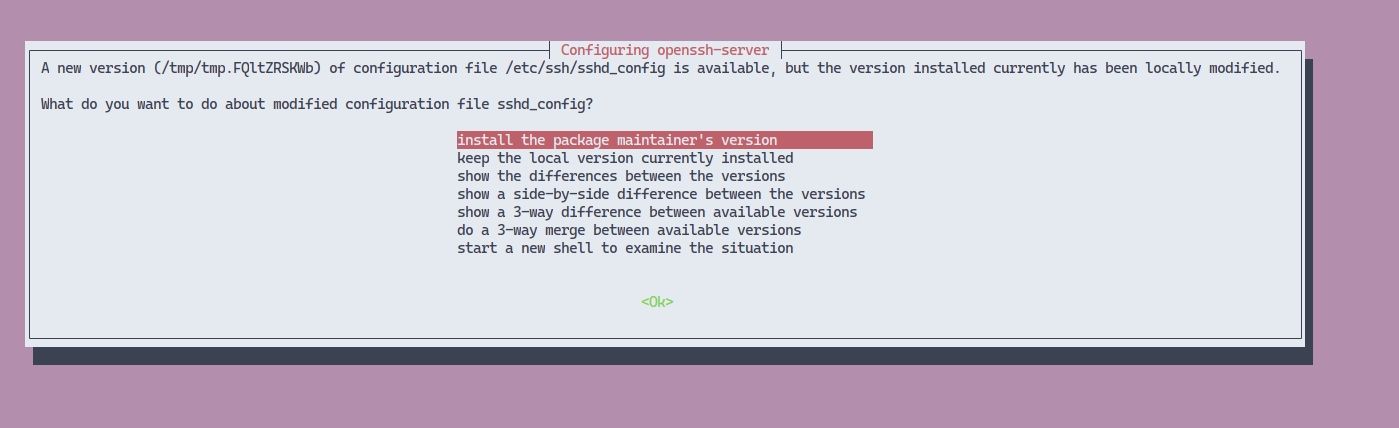
There will be some configuration changes and you'll probably be asked if you want to install a new version of certain software (see the screenshots and examples below). In most cases, it is completely fine to overwrite configuration changes, but be cautious if you have some custom configurations, since these actions will overwrite them:
After you ssh again, you can check your distribution version, which should match Ubuntu 22.04 LTS if the upgrade was performed successfully.
Trigger another distribution upgrade:
The remaining steps should be the same as in Step 2, although you won't be asked the same questions as in the first upgrade.
Note that it's possible that you won't be able to proceed with this due to some package incompatibility:
On one of our nodes, it was the postgres-client-15.
We resolved this issue by removing this package and installing it again after a successful upgrade:
Download the latest version of the interactive installer:
Run the installer:
Select the first option UPGRADE existing installation and proceed by choosing the v2.0.2 version from the list.
For the remaining questions, answer based on your previous setup and complete the binary upgrade.
The final step would be to make sure that your node is up and running and that it managed to sync with the network.
Run cheqd-noded status and check for "catching_up":false and also check if the latest_block_height and latest_block_time looks good to you.
Upgrade process includes 2 main parts:
Sending a SoftwareUpgradeProposal to the network
Moving to the new binary manually
SoftwareUpgradeProposalIn general, this proposal is the document which includes some additional information for operators about improvements in new version of application or another additional remarks. There are not any requirements for proposal text, just recommendations and information for operators. And also, please make sure that this proposal will be stored in the ledger in case of success voting process in the future.
The next steps are describing the general flow for making a proposal:
Send proposal command to the pool;
After getting it, ledger will be in the PROPOSAL_STATUS_DEPOSIT_PERIOD;
After sending the first deposit from one of other operators, proposal status will be moved to PROPOSAL_STATUS_VOTING_PERIOD and voting period (2 weeks for now) will be started;
The main parameters here are:
proposal_name - name of proposal which will be used in UpgradeHandler in the new application,
proposal_description - proposal description; limited to 255 characters; you can use json markdown to provide links,
upgrade_height - height when upgrade process will be occurred. Keep in mind that this needs to be after voting period has ended.
In case of successful submitting the next command can be used for getting proposal_id:
This command will return list of all proposals. It's needed to find the last one with corresponding name and title.
After getting deposit from the previous step, the VOTING_PERIOD will be started. For now, we have 2 weeks for making some discussions and collecting needed vote count. For setting vote, the next command can be used:
The main parameters here:
<proposal_id> - proposal identifier from [step](#Command for sending proposal)
<vote_option> - the actual vote (it can be yes, no, abstain, no_with_veto)
Votes can be queried by sending request:
At the end of voting period, after voting_end_time, the state of proposal with <proposal_id> should be changed to PROPOSAL_STATUS_PASSED, if there was enough votes Also, deposits should be refunded back to the operators.
{
  "price": {
    "denom": "ncheq",
    "amount": "0.005000000000000000"
  }
}Due to the voting period operators should send their votes to the pool, get new binary downloaded and got to be installed;
After voting period passing (for now it's 2 weeks) in case of success voting process proposal should be passed to PROPOSAL_STATUS_PASSED;
The next step is waiting for height which was suggested for upgrade.
On the proposed height current node will be blocked until new binary will be installed and set up.
upgrade_info - link to the upgrade info file, containing new binaries. Needs to contain sha256 checksum. See example - https://raw.githubusercontent.com/cheqd/cheqd-node/refs/heads/main/networks/mainnet/upgrades/upgrade-v3.json?checksum=sha256:5989f7d5bca686598c315eb74e8eb507d7f9f417d71008a31a6b828c48ce45eb
operator_alias - alias of a key which will be used for signing proposal,
<chain_id> - identifier of chain which will be used while creating the blockchain.
cheqd-noded tx gov submit-legacy-proposal software-upgrade <proposal_name> \
  --title "<proposal_title>" \
  --description "<proposal_description>" \
  --upgrade-height <upgrade_height> \
  --upgrade-info <upgrade_info> \
  --deposit 8000000000000ncheq \
  --from <operator_alias> \
  --chain-id cheqd-mainnet-1 \
  --gas auto \
  --gas-adjustment 1.4 \
--gas-prices 5000ncheqcheqd-noded query gov proposalscheqd-noded tx gov vote <proposal_id> <vote_option> --from <operator_alias> --chain-id <chain_id> --gas auto --gas-adjustment 1.5 --gas-prices 5000ncheqcheqd-noded query gov votes <proposal_id>After that, you'll be asked if you want to remove obsolete packages. It's always a good idea to check details (by pressing d ), especially if you have other software running on your node. In our case, we agreed to remove unused packages:
Finally, you'll be asked to restart your system to apply the changes. Your server should automatically reboot, but it's good to check with your cloud provider documentation and make sure this action won't cause any data loss.
It's probable that SSH fingerprint is going to change after the upgrade, so you won't be able to ssh to your server immediately. To resolve that, you'll need to run the following command on your localhost:
Check the distribution version:
After you complete the upgrade and restart your node again, you should ssh to your server again and check the distribution version. If everything was successful, you should get output like this:
Check the version of your cheqd-node:
Re-enable cheqd-cosmovisor.service and start your node:
sudo lsb_release -a$ lsb_release -a
No LSB modules are available.
Distributor ID: Ubuntu
Description: Ubuntu 24.04.1 LTS
Release: 24.04
Codename: noblecheqd-noded versionsudo systemctl enable cheqd-cosmovisor.service && sudo systemctl start cheqd-cosmovisor.servicesudo systemctl stop cheqd-cosmovisor.service && sudo systemctl disable cheqd-cosmovisor.servicesudo apt update && sudo apt upgrade -ysudo shutdown -r nowsudo do-release-upgradeReading cache
Checking package manager
Continue running under SSH?
This session appears to be running under ssh. It is not recommended
to perform a upgrade over ssh currently because in case of failure it
is harder to recover.
If you continue, an additional ssh daemon will be started at port
'1022'.
Do you want to continue?
Continue [yN] No valid mirror found
While scanning your repository information no mirror entry for the
upgrade was found. This can happen if you run an internal mirror or
if the mirror information is out of date.
Do you want to rewrite your 'sources.list' file anyway? If you choose
'Yes' here it will update all 'jammy' to 'noble' entries.
If you select 'No' the upgrade will cancel.
Continue [yN] Do you want to start the upgrade?
1 installed package is no longer supported by Canonical. You can
still get support from the community.
50 packages are going to be removed. 135 new packages are going to be
installed. 587 packages are going to be upgraded.
You have to download a total of 1,030 M. This download will take
about 3 minutes with a 40Mbit connection and about 27 minutes with a
5Mbit connection.
Fetching and installing the upgrade can take several hours. Once the
download has finished, the process cannot be canceled.
Continue [yN] Details [d]sudo do-release-upgradeCalculating the changes
Calculating the changes
Could not calculate the upgrade
An unresolvable problem occurred while calculating the upgrade.
The package 'postgresql-client-15' is marked for removal but it is in
the removal deny list.
If none of this applies, then please report this bug using the
command 'ubuntu-bug ubuntu-release-upgrader-core' in a terminal. If
you want to investigate this yourself the log files in
'/var/log/dist-upgrade' will contain details about the upgrade.
Specifically, look at 'main.log' and 'apt.log'.
Restoring original system statesudo apt purge postgres-client-15wget https://raw.githubusercontent.com/cheqd/cheqd-node/main/installer/installer.pypython3 installer.pyConfiguration file '/etc/systemd/timesyncd.conf'
==> Modified (by you or by a script) since installation.
==> Package distributor has shipped an updated version.
What would you like to do about it ? Your options are:
Y or I : install the package maintainer's version
N or O : keep your currently-installed version
D : show the differences between the versions
Z : start a shell to examine the situation
The default action is to keep your current version.
*** timesyncd.conf (Y/I/N/O/D/Z) [default=N] ?
Configuration file '/etc/sudoers'
==> Modified (by you or by a script) since installation.
==> Package distributor has shipped an updated version.
What would you like to do about it ? Your options are:
Y or I : install the package maintainer's version
N or O : keep your currently-installed version
D : show the differences between the versions
Z : start a shell to examine the situation
The default action is to keep your current version.
*** sudoers (Y/I/N/O/D/Z) [default=N] ? Remove obsolete packages?
84 packages are going to be removed.
Continue [yN] Details [d]System upgrade is complete.
Restart required
To finish the upgrade, a restart is required.
If you select 'y' the system will be restarted.
Continue [yN] ssh-keygen -R <host>